

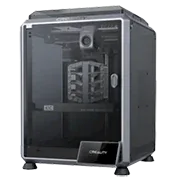
The Creality K1C is an enclosed CoreXY FDM printer in the prosumer class, built around carbon-fiber and abrasive materials from the factory floor up. The "C" stands for Carbon: the machine ships with a hardened nozzle and a closed chamber ready for CF-Nylon, PET-CF and PC with no extra upgrades needed. With a 220×220×250 mm build volume and speeds up to 600 mm/s, the K1C is an accessible entry point into engineering-grade 3D printing.
What it is
The K1C is Creality's carbon-optimized variant of the flagship K1. The "C" is not marketing: the printer ships from the factory with a hardened steel nozzle capable of handling abrasive CFR filaments without wear. The enclosed chamber maintains a consistently high ambient temperature, which is a prerequisite for ABS, ASA, PC and the more demanding nylons. A built-in AI camera monitors the print and flags visible defects. The machine runs Klipper firmware with Input Shaper and Pressure Advance support, and if speed is the goal, 600 mm/s is a real ceiling for PLA. The K1C targets makers, small workshops and educators who want to print functional parts from engineering materials directly, without swapping nozzles or adding an enclosure first.
Technical specifications
| Technology | FDM (CoreXY, enclosed chamber) |
|---|---|
| Build volume | 220 × 220 × 250 mm |
| Maximum speed | up to 600 mm/s |
| Nozzle | factory-hardened steel (Carbon-ready) |
| Calibration | automatic: leveling, Input Shaper, AI camera |
| Multi-material | single nozzle (no AMS) |
| Class / Price | Prosumer · ~€599 |
Who it’s for
- Automotive Jigs and Fixtures: creating high-strength fixtures and templates capable of withstanding heavy mechanical loads using CF-Nylon directly with the factory nozzle (Automotive)
- Rapid Prototyping: quick manufacturing of functional prototypes for fit, form and ergonomic testing at speeds up to 600 mm/s (Product Design)
- Custom Electronics Enclosures: small-batch manufacturing of specialized electronic housings requiring high precision and durability from ASA or PC inside the enclosed chamber (Consumer Electronics)
Calibration step by step
- Clean the build plate thoroughly using isopropyl alcohol (IPA). A clean, grease-free surface ensuring optimal first-layer bed adhesion.
- Perform automatic bed leveling and fine-tune the Z-offset distance. A perfectly squished first layer without elephant's foot deformation or poor adhesion.
- Calibrate extruder steps (E-steps) using command M92 and adjust the slicer flow rate. Accurate material extrusion, preventing both under-extrusion and over-extrusion.
Common defects and fixes
Recommended settings by material
Pick a material to see the recommended temperatures (empirical ranges from 561 OrcaSlicer/Bambu profiles) plus machine-specific tips:
Conclusion
The K1C is a rare exception in the prosumer segment: a printer that ships from the factory ready for carbon-fiber and engineering materials, with no nozzle upgrade or enclosure addition required. The closed chamber, factory-hardened nozzle and Klipper firmware with Input Shaper make it a practical tool for functional parts, not just visual prototypes. At around €599, the K1C offers an uncommon balance between affordability and engineering readiness.
The full picture
This article is one page from The Big Book of 3D Printing: 704 illustrated pages covering every technology, material and fix in one reference.
Read it on Kindle →Engineer, author of The Big Book of 3D Printing and additive manufacturing expert