

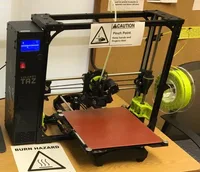
The LulzBot TAZ 6 is a large open-frame FDM printer in the prosumer class, built on the RepRap community's legacy and a fully open-source hardware and software philosophy. With a 280×280×250 mm build volume, automatic bed leveling and a unique interchangeable toolhead system, the TAZ 6 turns flexibility into a strategic advantage for engineers and researchers.
What it is
The TAZ 6 is an open platform, not a closed box. Its design descends from the RepRap project: every component is documented, repairable and replaceable. The defining feature is the interchangeable toolhead system: a single bolt swap lets you move from a single 0.5 mm nozzle to a dual-extrusion or 0.8 mm toolhead. The machine targets informed users in education, laboratories and small manufacturing who value platform transparency, a large build volume, and the ability to print flexible and engineering-grade materials without giving up access to the underlying settings.
Technical specifications
| Technology | FDM (open-frame, fully open-source) |
|---|---|
| Build volume | 280 × 280 × 250 mm |
| Maximum speed | up to 80 mm/s (recommended) |
| Toolheads | interchangeable: single, dual, 0.8 mm and more |
| Bed leveling | automatic (nozzle-probe) |
| Class / Price | Prosumer · ~€2500: large volume, open-source flexibility |
Who it’s for
- Engineering part prototyping: verifying form, fit and mechanical function with ABS and PETG across the generous build volume (Industrial design and R&D)
- Manufacturing jigs and fixtures: custom templates, fixtures and holding devices capable of withstanding mechanical stress (Automotive manufacturing)
- Educational models: teaching additive manufacturing principles and building functional STEM projects from idea to physical object (Education)
Calibration step by step
- Clean the heated build plate thoroughly with isopropyl alcohol (IPA). A clean, grease-free surface ensures optimal first-layer adhesion and prevents print failures.
- Run the automatic leveling sequence and fine-tune the Z-offset in 0.05 mm increments. Accurate nozzle-to-bed distance prevents elephant's foot or poor adhesion.
- Calibrate extruder E-steps using the M92 command to match commanded extrusion with actual output. Precise material flow that avoids over-extrusion blobs and under-extrusion gaps.
Common defects and fixes
Recommended settings by material
Pick a material to see the recommended temperatures (empirical ranges from 561 OrcaSlicer/Bambu profiles) plus machine-specific tips:
Conclusion
The TAZ 6 is the printer for those who treat openness not as a compromise but as a requirement. The generous build volume, interchangeable toolheads and fully documented platform make it an exceptionally flexible tool for engineering work with TPU and flexible materials, ABS prototyping and educational projects. The open-frame design demands a little extra care with warp-prone materials, but in return you get total control and a community ready to help.
The full picture
This article is one page from The Big Book of 3D Printing: 704 illustrated pages covering every technology, material and fix in one reference.
Read it on Kindle →Engineer, author of The Big Book of 3D Printing and additive manufacturing expert