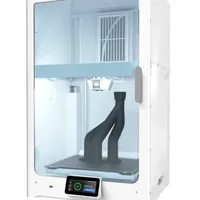
The Ultimaker S7 Pro Bundle is an enclosed professional-grade FDM printer built for production environments that demand continuous operation with engineering-grade polymers. The bundle ships with the Material Station for storage and automatic switching of up to six spools, the Air Manager for a filtered enclosure, and dual extrusion with soluble supports: all managed through Cura Enterprise.
What it is
The S7 Pro Bundle is a trio of devices operating as a single system. The S7 printer features active bed leveling, a flexible heated build plate and dual (CC + AA) print cores that allow simultaneous printing of the structural material and PVA supports. The Material Station holds up to six spools in a humidity-controlled environment and switches them automatically when a profile changes. The Air Manager seals the build chamber and scrubs the air of particles and volatile organic compounds: essential when printing ABS, ASA or Nylon in an office or laboratory. The machine targets engineers, production departments and R&D teams for whom repeatability and material freedom matter more than raw speed.
Technical specifications
| Technology | FDM (Bowden, enclosed chamber with Air Manager) |
|---|---|
| Build volume | 330 × 240 × 300 mm |
| Extrusion | dual (AA + CC print cores), active automatic bed leveling |
| Material handling | Material Station: 6 spools, humidity control, automatic switching |
| Class / Price | Professional · ~€12 000 |
Who it’s for
- Jigs and fixtures: production of high-strength templates and assembly fixtures from CF-Nylon and PC for conveyor lines with guaranteed repeatability (Automotive)
- Functional prototyping (dual-material precision prototypes with water-soluble PVA supports) rigid body with flexible TPU joints or complex internal geometry for ergonomic testing (Consumer electronics)
- Small-batch production: end-use parts and replacement components on demand from engineering polymers without expensive injection molding tooling (Manufacturing)
Calibration step by step
- Clean the flexible heated build plate thoroughly with isopropyl alcohol (IPA). A completely grease-free surface that ensures optimal first-layer adhesion and prevents bed adhesion failure.
- Run the automated active bed leveling routine. The printer maps the bed topography to compensate for micro-deviations and guarantees a perfect first layer.
- Perform XY offset calibration for the two print cores. Perfect horizontal alignment between the two nozzles: no overlaps or gaps when printing multi-material parts.
- Fine-tune the Z-offset parameter. The first layer is squished perfectly onto the bed: maximum adhesion without the "elephant's foot" defect at the base.
Common defects and fixes
Recommended settings by material
Pick a material to see the recommended temperatures (empirical ranges from 561 OrcaSlicer/Bambu profiles) plus machine-specific tips:
Conclusion
The S7 Pro Bundle is the choice for organisations where reliability, repeatability and material breadth matter more than speed. The Material Station solves moisture management and spool switching, the Air Manager makes engineering polymers safe in enclosed spaces, and dual extrusion with PVA supports unlocks geometries impossible on single-head machines. The upfront investment is high, but operational overhead and setup time are reduced to a minimum.
The full picture
This article is one page from The Big Book of 3D Printing: 704 illustrated pages covering every technology, material and fix in one reference.
Read it on Kindle →Engineer, author of The Big Book of 3D Printing and additive manufacturing expert
Updated on 11 September 2026
This article was written with AI assistance; the facts were checked against the sources on 11 September 2026.