

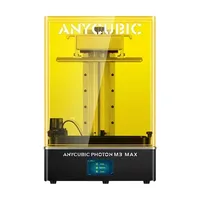
The Anycubic Photon M3 Max is a large-format mono LCD/MSLA printer in the prosumer class, engineered for printing large resin models with exceptional detail. With a 298 × 164 × 300 mm build volume, a 7K monochrome screen and the light power to deliver short exposure times, the M3 Max is the choice for artists, dental technicians and designers who need scale and precision together.
What it is
The Photon M3 Max is Anycubic's flagship in the monochrome LCD resin line. The 7K mono LCD panel transmits significantly more UV light than older RGB matrices: the result is shorter layer times (1–2 s) and a longer screen lifespan. The large 298 × 164 mm vat enables printing full busts, dental arches or batches of dozens of miniatures at once. The machine targets TTRPG/hobby artists, dental labs, jewellers and prototyping studios that need resin-level detail at a scale beyond standard desktop MSLA printers.
Technical specifications
| Technology | Mono LCD / MSLA (UV 405 nm) |
|---|---|
| Build volume | 298 × 164 × 300 mm |
| Screen resolution | 7K (6480 × 3600 px) monochrome LCD |
| XY resolution | 45.8 µm |
| Layer / Z-resolution | 10–200 µm (typically 50 µm) |
| Normal layer time | 1–2 seconds |
| Class / Price | Prosumer · ~€750 |
Who it’s for
- Large-scale miniatures and busts: printing full busts, dragons or tabletop scenes at full build volume with detail below 50 µm (Hobby, TTRPG, collectibles)
- Dental applications: dental arches, surgical guides and prosthetics with under-50 µm precision using biocompatible resins (Dental laboratories)
- High-detail prototyping: conceptual and visual prototypes with fine surface textures for product design and jewellery (Product design and jewellery)
Setup and calibration
- Level the build plate against the FEP bottom of the vat. Uniform first-layer adhesion to the build plate: the foundation for a successful print.
- Check the resin level within the vat walls. Sufficient resin covers the FEP membrane: insufficient resin causes incomplete layers.
- Run a UV calibration test (exposure matrix) with your chosen resin. You find the optimal normal and bottom-layer exposure times for that specific resin.
- Inspect and clean the FEP membrane: replace if needed. A cloudy or scratched FEP scatters light and destroys precision; a clean FEP is mandatory.
Common defects and fixes
Resin exposure helper
Pick a resin type for starting exposure values (typical for mono-LCD machines). These are STARTING points: always run an exposure test, because the exact seconds depend on your screen power and the specific resin:
Conclusion
The Photon M3 Max moves the goalposts on what a desktop resin printer can hold: its build volume is nearly double that of most MSLA competitors at this price point, while the 7K monochrome screen keeps detail at the same level as smaller machines. For artists, dental labs and jewellers needing scale without sacrificing precision, the M3 Max is one of the most compelling choices on the market.
The full picture
This article is one page from The Big Book of 3D Printing: 704 illustrated pages covering every technology, material and fix in one reference.
Read it on Kindle →Engineer, author of The Big Book of 3D Printing and additive manufacturing expert