

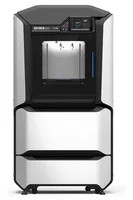
The Stratasys F170 is the entry-level model of the F123 series – an industrial FDM printer with a fully enclosed chamber, soluble supports and a GrabCAD Print workflow, designed for office environments and educational institutions. It delivers genuine industrial reliability at an accessible price for the segment.
What it is
The F170 is a closed-ecosystem machine: materials are Stratasys-certified cartridges, the workflow is GrabCAD Print (cloud-based slicing), and soluble supports (QSR or SR-35) are removed cleanly in a solvent tank with no manual mechanical work. The build volume is 254 × 254 × 254 mm – compact and sufficient for most prototypes and functional parts. Unlike the F370, the F170 supports fewer materials and does not reach the high-temperature engineering polymers of the upper models in the series, but retains all key industrial characteristics: repeatability, automated workflow and soluble supports.
Technical specifications
| Technology | FDM (enclosed chamber, industrial) |
|---|---|
| Build volume | 254 × 254 × 254 mm |
| Ecosystem / Materials | Closed – Stratasys certified cartridges |
| Supports | Soluble (QSR / SR-35) – no mechanical post-processing |
| Workflow | GrabCAD Print (cloud-based slicing) |
| Chamber | Fully enclosed, temperature-controlled |
| Class / Price | Industrial entry · ~€18 000 |
Applications and industries
- Functional prototypes – production of durable, repeatable prototypes for mechanical testing, form and fit checks, with clean soluble supports even on complex geometry (Industrial design and R&D)
- Education and training – reliable, office-friendly printer for technical universities and corporate training centers – minimal maintenance, predictable output (Education and corporate training)
- Jigs and fixtures – manufacturing aids, templates and end-use parts from ABS-M30 and ASA for light production and assembly lines (Manufacturing and automotive)
Production workflow
- Prepare the model in GrabCAD Print – assign material, supports and orientation. Automatically generated soluble supports and optimised slicing for the F170 without manual intervention.
- Load the model-material and support-material cartridges, verify levels. The printer confirms remaining material and blocks start if insufficient.
- Send the job from GrabCAD Print and wait for the printer's automatic initialisation. Automatic platform levelling and chamber heating to operating temperature.
- After completion, place the part in a dissolving tank (WaveWash / standard bath) with QSR or SR-35. Soluble supports dissolve cleanly in 1–8 h depending on complexity, without damaging the part.
Key considerations
Materials and applications
Pick a material/alloy this machine processes to see its properties and typical applications:
Conclusion
The Stratasys F170 is the right choice when industrial repeatability and clean soluble supports are required but budget or space constraints rule out a larger model. As the entry point of the F123 series, it retains everything essential – the GrabCAD Print workflow, an enclosed temperature-controlled chamber and automated support dissolution – in a more compact footprint at a more accessible price. Distinguish it from the F370 on two criteria: the F170 is optimal for ABS-M30, ASA and PLA; if the project requires Nylon, PC or PEKK, or a larger build volume, the next step is the F370.
The full picture
This article is one page from The Big Book of 3D Printing: 704 illustrated pages covering every technology, material and fix in one reference.
Read it on Kindle →Engineer, author of The Big Book of 3D Printing and additive manufacturing expert