

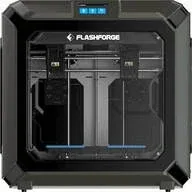
The FlashForge Creator 3 Pro is an enclosed prosumer FDM printer built around an IDEX system: both extruders move fully independently, which makes it a rare exception in its price bracket. With a 300 × 250 × 200 mm build volume and support for engineering polymers such as ABS, PC and PLA-CF inside a sealed chamber, the Creator 3 Pro targets engineers and small workshops that have outgrown a single-extruder machine.
What it is
IDEX stands for Independent Dual EXtruder: both print heads travel the X axis completely independently, without any mechanical coupling between them. This enables three modes: standard dual-material printing (primary material plus soluble support), duplication mode (printing two identical objects simultaneously) and mirror mode (symmetric parts for double throughput). The enclosed chamber maintains a stable ambient temperature around the print, which is a prerequisite for reliable ABS and PC output. The Creator 3 Pro has no AMS, LiDAR or automatic spool-switching: control is manual and direct, with the focus on repeatability and engineering precision.
Technical specifications
| Technology | FDM (IDEX, enclosed chamber) |
|---|---|
| Build volume | 300 × 250 × 200 mm |
| Extrusion system | IDEX: two independent extruders |
| Print modes | dual-material, duplication, mirror |
| Calibration | automatic bed leveling + manual Z-offset per head |
| Class / Price | Prosumer · ~€2 300 |
Who it’s for
- Complex geometries with soluble supports: The IDEX system allows simultaneous printing with a primary material and PVA or HIPS support, removed without mechanical contact, ideal for internal channels and heavy overhangs (Engineering and product development)
- Functional jigs and fixtures: small-batch production of robust jigs and fixtures from ABS, PC or PLA-CF inside a stable enclosed chamber for repeatable mechanical properties (Automotive and industrial manufacturing)
Calibration step by step
- Clean the build plate with isopropyl alcohol (IPA) and run the automatic bed leveling sequence. A mapped, leveled and degreased platform: optimal first-layer adhesion.
- Calibrate the Z-offset separately for the left and right extruder. Both nozzles sit at the correct distance from the bed: no squished or floating first layer.
- Print the IDEX X and Y axis alignment calibration test. The coordinate systems of both heads are synchronized: no seam steps or gaps at material transitions.
Common defects and fixes
Recommended settings by material
Pick a material to see the recommended temperatures (empirical ranges from 561 OrcaSlicer/Bambu profiles) plus machine-specific tips:
Conclusion
The Creator 3 Pro is the right choice when the job explicitly demands two independent materials: soluble supports for complex internal channels or parallel duplication mode to double throughput. The enclosed chamber makes engineering polymers such as ABS and PC fully practical, and the IDEX architecture is genuine rather than a compromise. The machine does not offer the automation of higher-tier competitors, but for engineers who prioritize precision and dual-material process flexibility above all else, the Creator 3 Pro is a powerful and proven platform.
The full picture
This article is one page from The Big Book of 3D Printing: 704 illustrated pages covering every technology, material and fix in one reference.
Read it on Kindle →Engineer, author of The Big Book of 3D Printing and additive manufacturing expert