

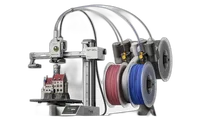
The Bambu Lab A1 is a fast, open-frame bedslinger in the hobby class that brought multi-color 3D printing to an affordable price point. With a 256×256×256 mm build volume, automatic calibration, and AMS Lite support for up to four simultaneous colors, the A1 is the ideal choice for beginners and enthusiasts who want results without unnecessary complexity.
What it is
The A1 is an open-frame bedslinger designed to be easy to set up and operate from day one. Automatic bed leveling and Z-offset calibration eliminate most manual steps, while the AMS Lite system enables multi-color printing with up to four spools without pausing. Unlike the enclosed X1C and P1S models, the A1 operates without a closed chamber: this makes it excellent for PLA and PETG, but limits its reliability with airflow-sensitive materials like ABS. The machine targets students, makers, and small-scale projects where ease of use and color variety matter more than engineering polymers.
Technical specifications
| Technology | FDM (Bedslinger, open frame) |
|---|---|
| Build volume | 256 × 256 × 256 mm |
| Maximum speed | up to 500 mm/s |
| Nozzle | standard brass (0.4 mm default) |
| Calibration | automatic: bed leveling and Z-offset |
| Multi-material | AMS Lite, up to 4 spools |
| Class / Price | Hobby · ~€340 |
Who it’s for
- Rapid Prototyping: creating form-checks, fit-checks and ergonomic tests in hours, leveraging the A1's high-speed FDM (Product Design)
- STEM Education: affordable multi-color platform with AMS Lite for classroom projects and student concept demonstrations (Education)
- Multi-color Hobby Projects: producing detailed multi-color miniatures, cosplay accessories and decorative models with AMS Lite (Hobby and Entertainment)
Calibration step by step
- Clean the PEI build plate with isopropyl alcohol (IPA) before printing. An oil-free surface ensures optimal first-layer adhesion and prevents print failures.
- Run the automatic bed leveling routine and load the filament securely. The printer maps the bed topology to compensate for unevenness, ensuring consistent nozzle distance.
- Monitor the start of the print and fine-tune the Z-offset during the first layer if necessary. The first layer adheres perfectly to the plate: neither over-squished nor too loose.
Common defects and fixes
Recommended settings by material
Pick a material to see the recommended temperatures (empirical ranges from 561 OrcaSlicer/Bambu profiles) plus machine-specific tips:
Conclusion
The Bambu Lab A1 is the best starting point for anyone who wants fast, multi-color 3D printing without complex setup. Automatic calibration and AMS Lite make PLA and PETG trivial, while the open frame delivers excellent cooling. If your needs stay within standard polymers, the A1 delivers impressive value for money.
The full picture
This article is one page from The Big Book of 3D Printing: 704 illustrated pages covering every technology, material and fix in one reference.
Read it on Kindle →Engineer, author of The Big Book of 3D Printing and additive manufacturing expert