

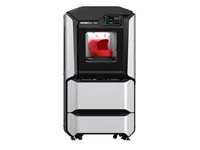
The Stratasys F370 is an office-class industrial FDM printer with a fully enclosed chamber, soluble supports and access to a broad portfolio of engineering thermoplastics. It targets production teams that demand high repeatability, minimal operator intervention and direct integration with GrabCAD Print.
What it is
The F370 is the flagship of the Stratasys F123 platform – a machine designed to bridge the gap between prototyping and office-based production. FDM (Fused Deposition Modeling) is a registered trademark of Stratasys denoting layer-by-layer deposition of molten thermoplastic. The closed ecosystem – the proprietary GrabCAD Print slicer, sealed material cartridges and soluble support materials (SR-30, SR-35) – guarantees consistent, predictable results without daily leveling rituals. The machine targets engineering departments and small production runs where part-to-part repeatability matters more than maximum speed.
Technical specifications
| Technology | FDM (enclosed chamber, soluble supports) |
|---|---|
| Build volume | 355 × 254 × 355 mm |
| Soluble supports | SR-30 / SR-35 (dissolve in alkaline solution) |
| Slicer / Control | GrabCAD Print (closed ecosystem) |
| Material system | Stratasys proprietary cartridges |
| Class / Price | Industrial · ~€60,000 |
Applications and industries
- Functional prototypes – production of strong, dimensionally accurate prototypes from ABS-M30 or PC-ABS with soluble supports enabling complex internal geometries without manual support removal (Product design and R&D)
- Tooling and fixtures – manufacturing of assembly jigs, welding templates and inspection fixtures from carbon-filled Nylon 12CF, capable of withstanding production-floor mechanical loads (Automotive and electronics)
- End-use parts – short runs – direct manufacturing of end-use components from engineering polymers (ASA, PC-ABS) in run volumes where injection molding is not economically justified (Medical devices and industrial equipment)
Production workflow
- File preparation in GrabCAD Print – import CAD geometry, select material and layer resolution, verify the automatically generated SR soluble supports. An optimised print file with correctly positioned supports, ready for direct dispatch to the machine.
- FDM printing with soluble supports – start the machine; it automatically regulates chamber temperature and manages both extrusion heads (model + support). A completed part with SR material embedded in the support zones – the enclosed chamber ensures minimal warping even with ABS and Nylon.
- Support dissolution – place the part in a WaveWash or compatible alkaline bath (NaOH solution, ~70 °C) for 2–8 hours depending on the mass of support material. A fully clean part with finished internal channels and undercuts inaccessible to manual support removal.
- Finishing – rinse the part with clean water, verify dimensions with calipers or CMM; apply bead blasting or chemical smoothing if required. A production-ready part meeting engineering tolerances, with a documented chain from GrabCAD Print through to the finished manufacturing work order.
Key considerations
Materials and applications
Pick a material/alloy this machine processes to see its properties and typical applications:
Conclusion
The Stratasys F370 is a machine for production teams, not hobbyists. The closed ecosystem and soluble supports turn complex geometries into routine work, and GrabCAD Print delivers a documented, traceable production chain. Material cost and the absence of third-party consumables demand a clear business case – but when correctly applied, the F370 delivers industrial repeatability that no desktop printer can match.
The full picture
This article is one page from The Big Book of 3D Printing: 704 illustrated pages covering every technology, material and fix in one reference.
Read it on Kindle →Engineer, author of The Big Book of 3D Printing and additive manufacturing expert