

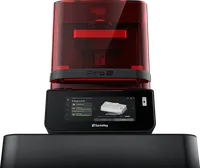
The SprintRay Pro 2 is a professional dental DLP printer engineered entirely for dental laboratories and clinics. With a validated dental workflow, a precise DLP light engine and a closed material ecosystem of SprintRay resins, the Pro 2 delivers clinically accurate parts (models, splints, temporary crowns and surgical guides) with the reliability demanded in dental practice.
What it is
The Pro 2 is the predecessor to the SprintRay Pro 95 S and represents a mature generation of dental DLP technology. The machine uses a UV DLP projector that cures an entire layer simultaneously, achieving high speed without compromising accuracy. The closed platform enforces use of SprintRay-certified dental resins only, guaranteeing biocompatibility and predictable clinical outcomes. The Pro 2 is designed to slot directly into the digital dental workflow, from CAD design (3Shape, Dental Wings, exocad) through printing to washing (SprintRay MoonRay Wash) and post-cure (SprintRay Pro Cure).
Technical specifications
| Technology | DLP (digital light processing, UV) |
|---|---|
| Build volume | ~192 × 108 × 200 mm |
| XY resolution | ~75 µm |
| Layer thickness | 50 – 100 µm (typically 100 µm dental) |
| Material system | closed: SprintRay validated dental resins only |
| Connectivity | Wi-Fi + Ethernet; SprintRay Cloud slicer |
| Class / Price | Dental professional · ~€7 000 – 9 000 |
Applications and industries
- Dental models and diagnostic casts: precise dental arch study models and working models for prostheses, crowns and bridges, printed directly from intraoral scanner data (Dental, dental laboratories)
- Occlusal splints and retainers: thermoforming models and directly printed splints from biocompatible resin for bruxism treatment and orthodontic retention (Dental, clinics and orthodontists)
- Temporary crowns and bridges (PMMA-based temporary restorations with precise fit, produced within a single clinical visit (Dental) clinical dentistry)
- Surgical implant guides: high-accuracy stereolithographic guides for drill positioning during implant placement: made from biocompatible clear resin (Dental: oral surgery)
Production workflow
- Export the CAD file from your dental design software (3Shape, exocad, Dental Wings) as.STL or.3MF and load it into the SprintRay Cloud slicer. The file is correctly oriented and supported: the slicer applies automatically validated parameters for the selected resin.
- Select the correct resin profile (e.g. Model Resin, Splint Resin, Crown Resin) and confirm layer thickness (100 µm standard). The profile contains validated exposure times and UV power: no manual corrections needed.
- Open the resin tank, add resin, fit the build platform and start the print from the tablet or SprintRay Cloud. The printer confirms detected resin and begins printing; status is monitored in real time.
- After completion, remove the platform, wash parts in the SprintRay MoonRay Wash (isopropyl alcohol, 2 × 2 min cycle) and post-cure in the SprintRay Pro Cure for the resin-specified duration. Parts reach full mechanical strength and the biocompatibility required by the dental class.
Key considerations
Materials and applications
Pick a material/alloy this machine processes to see its properties and typical applications:
Conclusion
The SprintRay Pro 2 is a specialized machine for the dental industry: not a general-purpose printer, but a validated clinical instrument. Its closed material system, integrated Cloud workflow and focus on biocompatibility make it a reliable choice for dental laboratories and clinics seeking predictable results within the digital dental workflow.
The full picture
This article is one page from The Big Book of 3D Printing: 704 illustrated pages covering every technology, material and fix in one reference.
Read it on Kindle →Engineer, author of The Big Book of 3D Printing and additive manufacturing expert