

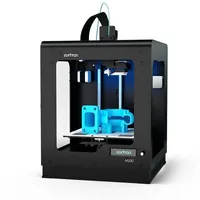
The Zortrax M200 is an enclosed FDM printer in the prosumer class, built around the proprietary Z-SUITE ecosystem: software, materials and hardware designed to work together without compromise. With a 200×200×180 mm build volume and a perforated platform with auto-leveling, the M200 is synonymous with reliability and repeatability for engineers and small workshops.
What it is
The M200 is the machine with which Zortrax built its reputation as a supplier of reliable desktop printers for industry. The enclosed chamber and perforated platform deliver excellent adhesion without glues or sprays, while the Z-SUITE slicer is optimized specifically for Zortrax materials: Z-ULTRAT (ABS-like, for functional parts) and Z-HIPS. The machine targets engineers, R&D teams and production cells that value predictability over speed and want to print, not tune.
Technical specifications
| Technology | FDM (enclosed chamber, Cartesian) |
|---|---|
| Build volume | 200 × 200 × 180 mm |
| Build plate | perforated metal platform with auto-leveling |
| Slicer | Z-SUITE (closed ecosystem) |
| Class / Price | Prosumer · ~€1 900 |
Who it’s for
- Functional prototyping: creating dimensionally accurate and mechanically resilient prototypes to verify form, fit and function before mass production (Automotive)
- Jigs and fixtures: manufacturing custom assembly aids, alignment tools and holding fixtures to streamline factory-floor operations (Manufacturing)
- Protective enclosures for electronics: printing custom, durable housings for PCB prototypes and IoT devices using high-impact-resistance materials (Consumer electronics)
Calibration step by step
- Clean the perforated build plate's metal squares and the nozzle tip from residue of previous prints. A clean surface ensures proper electrical conductivity for the auto-leveling sensor system.
- Launch the platform auto-calibration sequence from the printer's LCD menu. The nozzle automatically touches the designated silver calibration squares to measure the bed tilt.
- Adjust the under-bed leveling screws exactly as instructed by the LCD screen. A perfectly leveled platform across all axes: guarantees optimal first-layer adhesion.
Common defects and fixes
Recommended settings by material
Pick a material to see the recommended temperatures (empirical ranges from 561 OrcaSlicer/Bambu profiles) plus machine-specific tips:
Conclusion
The M200 is the choice of engineers who place reliability and repeatability above speed and flexibility. The closed Z-SUITE ecosystem eliminates setup guesswork, and the perforated platform with auto-leveling minimizes first-layer failures. If you work primarily with ABS-like materials and need a printer that simply works: the M200 is a proven choice.
The full picture
This article is one page from The Big Book of 3D Printing: 704 illustrated pages covering every technology, material and fix in one reference.
Read it on Kindle →Engineer, author of The Big Book of 3D Printing and additive manufacturing expert