

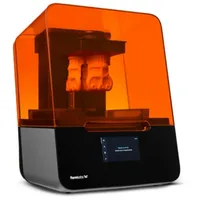
The Formlabs Form 3+ is a professional SLA printer using LFS (Low Force Stereolithography): laser stereolithography with a flexible silicone tank bottom that minimizes peel forces. With a 145 × 145 × 185 mm build volume and a closed Formlabs ecosystem (PreForm + cartridge resin), the Form 3+ is a benchmark desktop machine delivering laboratory-grade accuracy and a broad library of engineering, dental and biocompatible resins.
What it is
The Form 3+ uses LFS (Low Force Stereolithography): an SLA variant with a flexible tank bottom that reduces peel forces at every layer, enabling printing of detailed and delicate geometries without deformation. The machine operates in a fully closed ecosystem: Formlabs PreForm automatically optimizes parameters based on the chip in the resin cartridge, users never manually set laser intensity or exposure. The target audience is engineering teams, dental labs, jewelers and medical manufacturers who require repeatability, high resolution and access to certified materials.
Technical specifications
| Technology | SLA / LFS (Low Force Stereolithography, 405 nm laser) |
|---|---|
| Build volume | 145 × 145 × 185 mm |
| XY resolution | 25 µm (laser spot size) |
| Layer thickness | 25 – 300 µm (resin dependent) |
| Material system | closed: Formlabs cartridges (chip-based auto-configuration) |
| Post-processing | Form Wash (IPA rinse) + Form Cure (UV post-cure) |
| Class / Price | Prosumer / Professional · ~€3200 |
Applications and industries
- High-accuracy engineering prototypes: functional prototypes with tolerances under 0.1 mm, detailed ribs and threads, using Tough 2000 or Rigid resins (Product design and R&D)
- Dental appliances and surgical guides (dental models, retainers, surgical guides and temporary crowns from BioMed and Dental LT Clear resins) certified for clinical use (Dental medicine and orthopedics)
- Jewelry and castable patterns: precision wax patterns and casting models for investment casting of gold, silver and platinum with Castable Wax resin (Jewelry and luxury goods)
Production workflow
- Open PreForm, load the.STL/.OBJ file and select the resin from the menu: PreForm automatically sets all print parameters from the cartridge chip. Zero manual configuration: optimized supports, orientation and exposure for the specific resin.
- Auto-generate supports in PreForm or place them manually; send the job directly to the printer via Wi-Fi or USB. Correctly oriented supports reduce deformation and ensure successful peeling at every layer.
- After the print is complete, place the part in Form Wash with IPA for 20 minutes (or per the resin protocol). Completely removed uncured resin: the surface is clean and ready for post-cure.
- Place the washed part in Form Cure at the recommended temperature and UV cycle from the resin protocol. Full polymerization: the final mechanical and chemical properties of the resin are achieved.
Key considerations
Materials and applications
Pick a material/alloy this machine processes to see its properties and typical applications:
Conclusion
The Form 3+ is the right choice when accuracy, repeatability and access to certified materials matter more than speed and low resin cost. The closed Formlabs ecosystem means minimal configuration and predictable results, at the cost of higher cartridge expenditure and mandatory post-processing with Form Wash and Form Cure.
The full picture
This article is one page from The Big Book of 3D Printing: 704 illustrated pages covering every technology, material and fix in one reference.
Read it on Kindle →Engineer, author of The Big Book of 3D Printing and additive manufacturing expert