

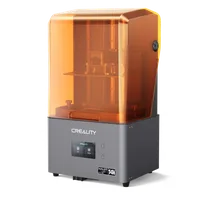
The Creality Halot Mage Pro is a budget-class 8K mono LCD MSLA printer with a 228 × 128 × 230 mm build volume, integrated air filtration and a resin-warming system. It targets enthusiasts and small workshops looking for high-detail resin printing at an accessible price point.
What it is
The Halot Mage Pro uses a monochrome 8K LCD panel with an 11520 × 5120-pixel resolution on a 10.3-inch screen: a pixel pitch of approximately 19 µm. Mono LCD/MSLA matrices allow curing exposures as short as 1–2 seconds per layer, dramatically faster than standard RGB displays. The integrated activated-carbon filter reduces harmful fumes, and the resin heater shortens warm-up time in cooler environments. The printer is operated via a touch screen and supports leading slicers: Chitubox and Lychee Slicer.
Technical specifications
| Technology | Mono LCD / MSLA (8K) |
|---|---|
| Build volume | 228 × 128 × 230 mm |
| Screen resolution | 11520 × 5120 px (10.3") |
| Pixel pitch | ~19 µm (XY) |
| Layer thickness | 0.01 – 0.2 mm |
| Print speed | up to 70 mm/h |
| Class / Price | Budget · ~€450 |
Who it’s for
- Gaming miniatures and figurines: detailed tabletop miniatures with smooth surfaces and fine textures impossible with FDM (Hobby and gaming)
- Dental and orthodontic models: accurate jaw models, surgical guides and precise dental prosthetics from certified dental resin (Dentistry)
- Jewellery and casting patterns: wax and castable resins for master patterns used in silver and gold casting (Jewellery)
- Fine-detail engineering prototypes (functional and visual prototypes with tolerances under 0.1 mm) connectors, housings and miniature mechanisms (Product design and R&D)
Setup and calibration
- Clean the FEP film and the build platform with isopropyl alcohol (IPA). Residual particles and oils removed: the primary cause of FEP sticking.
- Level the build platform using the "paper test" method or built-in auto-levelling. Uniform gap across the full area ensures good adhesion of the model base.
- Run an Exposure Validation Matrix (XP2 test or RERF) for the chosen resin. Optimal normal and bottom exposure found: no under-cure or loss of fine detail.
- Check the resin level in the vat: top up between the MIN–MAX marks. Sufficient resin to fully cover the FEP on every platform lift cycle.
Common defects and fixes
Resin exposure helper
Pick a resin type for starting exposure values (typical for mono-LCD machines). These are STARTING points: always run an exposure test, because the exact seconds depend on your screen power and the specific resin:
Conclusion
The Halot Mage Pro is a solid choice for anyone taking their first steps in resin 3D printing or expanding a hobby workshop. The 8K resolution and integrated filter make it competitive in its price bracket, while broad support in Chitubox and Lychee Slicer guarantees a fast start. The key to success is dialling in the correct exposure for every resin: invest an hour in the RERF test and the machine will reward you with flawless detail.
The full picture
This article is one page from The Big Book of 3D Printing: 704 illustrated pages covering every technology, material and fix in one reference.
Read it on Kindle →Engineer, author of The Big Book of 3D Printing and additive manufacturing expert