

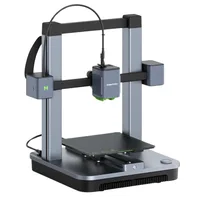
The AnkerMake M5C is a fast, open-frame FDM printer in the hobby class, designed for makers who value speed and simplicity. With a 220×220×250 mm build volume and speeds up to 500 mm/s, the M5C proves that an affordable machine can print fast and reliably, without a touchscreen, but with intuitive control entirely through a mobile app.
What it is
The M5C is the open-frame, more affordable model in the AnkerMake lineup: stripped of a screen and camera, but without compromise on speed. Control is handled entirely through the official smartphone app, and the only physical input is a multi-function button on the body. The machine features direct drive extrusion and automatic leveling, making it approachable for beginners who want speed without complex setup. The open frame positions it firmly in PLA, PETG and TPU territory, while honest ABS printing is possible with appropriate ambient conditions.
Technical specifications
| Technology | FDM (open frame, bedslinger) |
|---|---|
| Build volume | 220 × 220 × 250 mm |
| Maximum speed | up to 500 mm/s |
| Extruder | direct drive |
| Calibration | automatic bed leveling (ABL) |
| Control | no screen: app + physical button |
| Class / Price | Hobby · ~€350 |
Who it’s for
- Rapid Prototyping: fast iteration of physical product designs for fit, form and ergonomic testing using PLA or PETG at speeds up to 500 mm/s (Product Design and Engineering)
- Custom Tooling and Fixtures: manufacturing localized brackets and alignment fixtures for small-scale assembly operations (Light Manufacturing)
- STEM Education: hands-on introduction of students to 3D modeling, mechanics and additive manufacturing principles with an easy-to-use machine (Education)
Calibration step by step
- Launch the automated multi-point auto bed leveling (ABL) sequence from the app. The printer probes the bed and creates a digital mesh to automatically compensate for minor surface unevenness during printing.
- Print a single-layer test pattern and micro-adjust the Z-offset in real-time via the app. The extruded lines should be slightly squished forming a solid, uniform sheet: no gaps (too high) or rough ridges (too low).
- Calibrate the extrusion flow rate by printing a hollow cube and measuring the physical walls with calipers. The measured wall thickness precisely matches the CAD dimensions, eliminating over-extrusion or under-extrusion issues.
Common defects and fixes
Recommended settings by material
Pick a material to see the recommended temperatures (empirical ranges from 561 OrcaSlicer/Bambu profiles) plus machine-specific tips:
Conclusion
The AnkerMake M5C is an honest machine for its price: fast, compact and easy to use once you accept that control lives entirely in an app. The open frame limits the material range to PLA, PETG and TPU, with ABS possible but demanding care. For a beginner or enthusiast who wants speed without complexity, the M5C is a solid choice.
The full picture
This article is one page from The Big Book of 3D Printing: 704 illustrated pages covering every technology, material and fix in one reference.
Read it on Kindle →Engineer, author of The Big Book of 3D Printing and additive manufacturing expert