

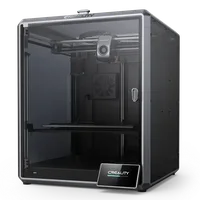
The Creality K1 is an enclosed CoreXY FDM printer in the prosumer class that brought speeds up to 600 mm/s to an accessible price point. With a 220×220×250 mm build volume, automatic calibration and an enclosed chamber, the K1 is the machine for those who want speed and reliability without breaking the bank.
What it is
The K1 is Creality's fast enclosed CoreXY machine: the frame is sealed, Input Shaper compensates for resonances at high speeds, and automatic leveling takes care of setup. The standard brass nozzle handles PLA, PETG, TPU, ABS, ASA and PC, but it cannot withstand abrasive filaments like CF-reinforced materials: those require a hardened nozzle, which comes factory-fitted only on the K1C. There is no AMS: the K1 runs a single spool. The machine targets makers, designers and small workshops that value speed but do not need multi-material printing.
Technical specifications
| Technology | FDM (CoreXY, enclosed chamber) |
|---|---|
| Build volume | 220 × 220 × 250 mm |
| Maximum speed | up to 600 mm/s |
| Nozzle | standard brass (not for CF without upgrade) |
| Calibration | automatic: leveling, Input Shaper |
| Multi-material | none (single spool) |
| Class / Price | Prosumer · ~€580 |
Who it’s for
- Ultra-fast prototyping: quickly producing form and fit-check models at up to 600 mm/s to validate designs before mass production (Product Design and Engineering)
- Automotive Jigs and Fixtures: manufacturing custom alignment tools, holding templates and assembly aids from strong, heat-resistant materials (Automotive Manufacturing)
- Custom Electronic Enclosures: printing durable and precise outer shells for tech prototypes, leveraging ABS or PC inside the heated enclosure (Consumer Electronics)
Calibration step by step
- Clean the PEI build plate thoroughly with isopropyl alcohol (IPA) to remove oils and dust. A degreased surface ensuring optimal first-layer adhesion.
- Execute the automated bed leveling (ABL) sequence. An accurate topographical mesh that automatically compensates for any unevenness on the heated bed.
- Perform Input Shaper (resonance) calibration using the toolhead's accelerometer. Software compensation of frame resonance frequencies to eliminate ghosting artifacts at high print speeds.
- Print a first-layer test patch and fine-tune the Z-offset. A perfectly squished first layer with no gaps between lines and no elephant's foot bulging.
- Calibrate extruder E-steps and print a Flow Rate (Extrusion Multiplier) tower. Accurate material output preventing under-extrusion gaps and over-extrusion blobs.
Common defects and fixes
Recommended settings by material
Pick a material to see the recommended temperatures (empirical ranges from 561 OrcaSlicer/Bambu profiles) plus machine-specific tips:
Conclusion
The Creality K1 is the right choice for makers and designers who want CoreXY speed and an enclosed chamber for ABS, ASA and PC, without paying for features they do not need. The standard nozzle covers most engineering materials, but if you plan to run CF-reinforced filaments, look at the K1C: it ships with a hardened nozzle from the factory and is purpose-built for abrasive materials.
The full picture
This article is one page from The Big Book of 3D Printing: 704 illustrated pages covering every technology, material and fix in one reference.
Read it on Kindle →Engineer, author of The Big Book of 3D Printing and additive manufacturing expert