

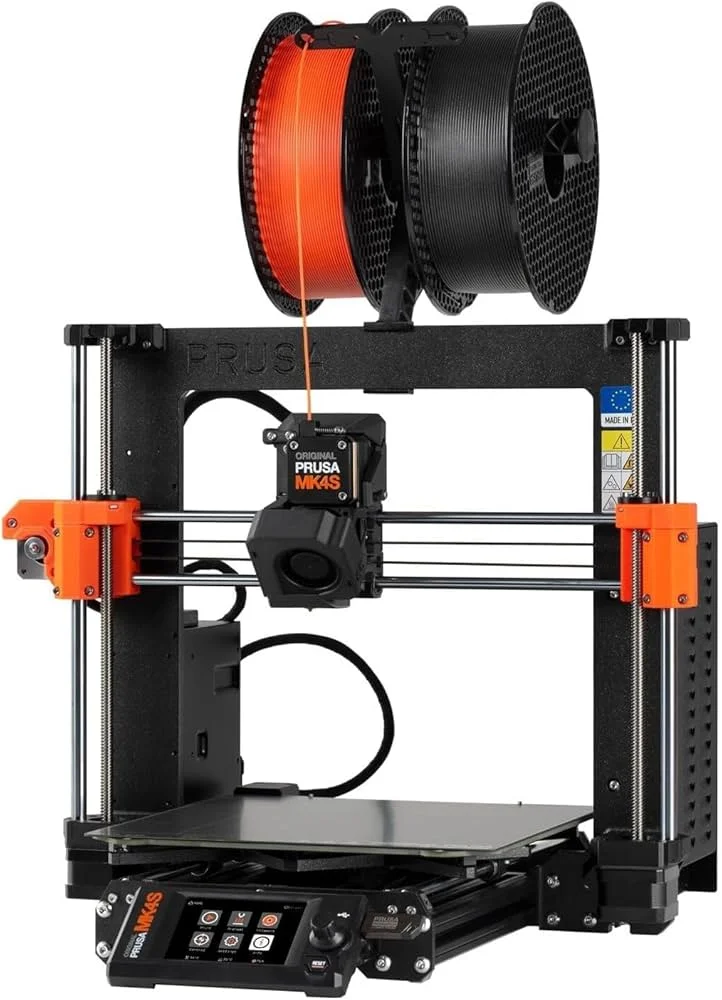
The Prusa MK4S is a prosumer FDM printer with an open i3-style bedslinger frame, designed by Prusa Research: the pioneers of reliable desktop 3D printing. With a 250×210×220 mm build volume, the Nextruder extruder, Input Shaper for vibration compensation and speeds up to 200–300 mm/s, the MK4S is the choice for makers and small workshops that value openness, community and long-term support.
What it is
The MK4S is the fourth generation of the legendary Prusa i3 line: an open frame with a heated bed and the Nextruder, driven by a planetary gear for precise and reliable extrusion. The printer features automatic bed leveling, Input Shaper for resonance suppression and an optional enclosure sold separately. Without a built-in camera or enclosed chamber by default, the MK4S shines at PLA, PETG and TPU, while for ABS and ASA it is honest to say: warping is a real risk without an added enclosure. The optional MMU3 system enables multi-material and multi-color printing with up to 5 spools. Widely supported by PrusaSlicer and a large community, the printer is a synonym for transparency, documentation and repairability.
Technical specifications
| Technology | FDM (i3 bedslinger, open frame) |
|---|---|
| Build volume | 250 × 210 × 220 mm |
| Maximum speed | up to 200–300 mm/s (with Input Shaper) |
| Extruder | Nextruder (planetary gear) |
| Calibration | automatic: leveling, Z-offset, Input Shaper |
| Multi-material | optional MMU3: up to 5 spools |
| Class / Price | Prosumer · ~€800 |
Who it’s for
- Jigs & Fixtures production: printing strong assembly jigs, manufacturing fixtures and tooling aids for small or specialised production runs (Automotive and Mechanical Engineering)
- Rapid prototyping: iterative design for geometry verification, fit-check of mechanical assemblies and ergonomics testing before mass production (Consumer electronics and Product design)
- Educational and STEM projects: producing physical models from digital CAD files to learn 3D printing technologies and engineering design principles (Education and Science)
Calibration step by step
- Clean the PEI plate with isopropyl alcohol (IPA) before every session. An oil-free surface guarantees maximum adhesion and prevents first-layer detachment.
- Run automatic bed leveling and fine-tune the Z-offset on the first layer. A perfectly trammed bed and optimal squish: no elephant's foot or lifting.
- Calibrate E-steps and set the flow rate through a test print. The Nextruder delivers a precise filament volume: over- and under-extrusion eliminated.
- Run Input Shaper and Pressure Advance calibration in PrusaSlicer or directly on the printer. Vibration echo lines suppressed and perfectly sharp corners even at high print speeds.
Common defects and fixes
Recommended settings by material
Pick a material to see the recommended temperatures (empirical ranges from 561 OrcaSlicer/Bambu profiles) plus machine-specific tips:
Conclusion
The Prusa MK4S is a proven and transparent choice for anyone who values an open platform, a strong community and long-term support. Input Shaper and the Nextruder extract real speed and precision from the open frame, while the optional MMU3 and enclosure extend capabilities when needed. An honest printer with honest trade-offs: PLA, PETG and TPU are in their native environment; ABS and ASA demand an added enclosure.
The full picture
This article is one page from The Big Book of 3D Printing: 704 illustrated pages covering every technology, material and fix in one reference.
Read it on Kindle →Engineer, author of The Big Book of 3D Printing and additive manufacturing expert