

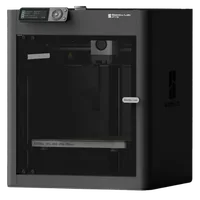
The Bambu Lab P1S is an enclosed CoreXY FDM printer in the prosumer class that brings the speed and reliability of the X1C at a more accessible price. With a 256×256×256 mm build volume, speeds up to 500 mm/s, automatic calibration and an optional AMS, the P1S is the natural next machine for engineers and designers ready to move beyond PLA.
What it is
The P1S is the enclosed sibling of the P1P: an added chamber, quieter fans and covered panels create a stable environment for engineering materials like ABS, ASA, PC and CF-Nylon. Unlike the flagship X1C, the P1S operates without LiDAR, but it carries the same monitoring camera and supports the AMS for automatic material switching as an optional add-on. It targets prototypers and small workshops that need a broad material range and high speeds, without paying for features they don't need.
Technical specifications
| Technology | FDM (CoreXY, enclosed chamber) |
|---|---|
| Build volume | 256 × 256 × 256 mm |
| Maximum speed | up to 500 mm/s |
| Nozzle | standard steel (swappable) |
| Calibration | automatic: leveling, Input Shaper, Flow Calibration (no LiDAR) |
| Multi-material | AMS (optional), up to 4 spools |
| Class / Price | Prosumer · ~€600 |
Who it’s for
- High-speed prototyping: physical prototypes to verify form and fit using PLA or PETG within hours rather than days, leveraging the CoreXY kinematics up to 500 mm/s (Product design and consumer electronics)
- Manufacturing jigs and fixtures: durable tooling, templates and assembly aids from ABS, ASA or PA-CF, reinforced by the printer's active enclosure (Automotive and industrial manufacturing)
- Multi-color educational models: complex, multi-colored educational props and visual aids by leveraging the optional Bambu Lab AMS add-on (Education and STEM)
Calibration step by step
- Clean the PEI plate with isopropyl alcohol (IPA). An oil-free surface guarantees maximum first-layer adhesion.
- Run automatic bed leveling (ABL). The print head probes multiple points across the heated bed and generates a compensation mesh for a perfect first layer: no LiDAR, but with high accuracy.
- Run Flow Rate and Pressure Advance calibration. Optimized flow and precise pressure advance: no over-extrusion blobs or under-extrusion gaps.
- Execute resonance compensation (Input Shaper). Suppressed ringing and ghosting at high CoreXY speeds.
Common defects and fixes
Recommended settings by material
Pick a material to see the recommended temperatures (empirical ranges from 561 OrcaSlicer/Bambu profiles) plus machine-specific tips:
Conclusion
The P1S makes a compelling case that you don't need to pay for LiDAR or flagship status to get an enclosed chamber, automatic calibration and speeds up to 500 mm/s. With support for a broad range of engineering materials and the option to add the AMS, it fills exactly the gap between entry-level affordability and the premium X1C, without compromising reliability.
The full picture
This article is one page from The Big Book of 3D Printing: 704 illustrated pages covering every technology, material and fix in one reference.
Read it on Kindle →Engineer, author of The Big Book of 3D Printing and additive manufacturing expert