STL to STEP converter, free and fully in your browser
Turn a triangle mesh into a STEP solid that any CAD package opens. The free conversion runs on your own machine through WebAssembly, so nothing is uploaded. When you need a part you can really edit, editable CAD rebuilds real planes, cylinders and standard holes.
Free, no account, no watermark. Editable CAD: 4.90 EUR per file, free preview first.Measured example
Measured with 2 sample STL files
| sample | triangles | CAD faces | volume, mm³ | STEP, KB | time, s |
|---|---|---|---|---|---|
| 20 mm cube (12 triangles) | 12 | 12 | 8000 | 26 | 0.8 |
| model with 2400 triangles | 2400 | 2400 | 21145 | 5511 | 27 |
How it works
Three steps, about two minutes for a typical mechanical part.
Pick your mesh file
STL, OBJ, PLY or 3MF. Large files are fine, because the work happens on your machine rather than on a shared server.
Let it rebuild the geometry
OpenCASCADE, compiled to WebAssembly, converts the triangles into BREP surfaces. No upload, no queue, no daily quota.
Download the STEP file
You get a .step file ready for Fusion 360, SolidWorks, FreeCAD, Inventor, Onshape or anything else that reads AP214.
Reference
Accepted input
| Parameter | Value | Unit |
|---|---|---|
| Format STL | model/stl, .stl | |
| Format OBJ | model/obj, .obj | |
| Format PLY | application/x-ply, .ply | |
| Format 3MF | model/3mf, .3mf | |
| Files per upload | 1 | |
| Max file size | 32 | MB |
| Max triangles | 50000 |
One file per conversion; formats are STL, OBJ, PLY, 3MF
Output and options
| Parameter | Value | Unit |
|---|---|---|
| Output format | STEP | |
| Sewing tolerance | 0.000001 | mm (closer edges are merged into one) |
| Decimation | 10% to 100%, step 10%, default 100% | |
| Result | a closed solid when the mesh is watertight, otherwise an open surface | |
| Volume | computed only for a closed solid |
STEP is the only output; with recognition off, faces equal the triangle count
Opens everywhere
STEP AP214 is the neutral exchange format, so the output is not tied to any vendor.
Why this converter
Most online converters ask you to hand over the file first. This one never sees it.
The free conversion runs on your machine
WebAssembly does the work inside the browser tab. Useful when the model belongs to a client or sits under an NDA.
Real BREP output
A closed solid made of exact flat faces, not a mesh wrapped in a STEP container. For a few clean, editable faces, use editable CAD.
Four input formats
STL in binary and ASCII, plus OBJ, PLY and 3MF. One output that every mainstream CAD system imports.
No queue and no quota
Because the free conversion is local, there is no server to be busy and no cap on how many files you run through it.
Free faceted STEP or editable CAD
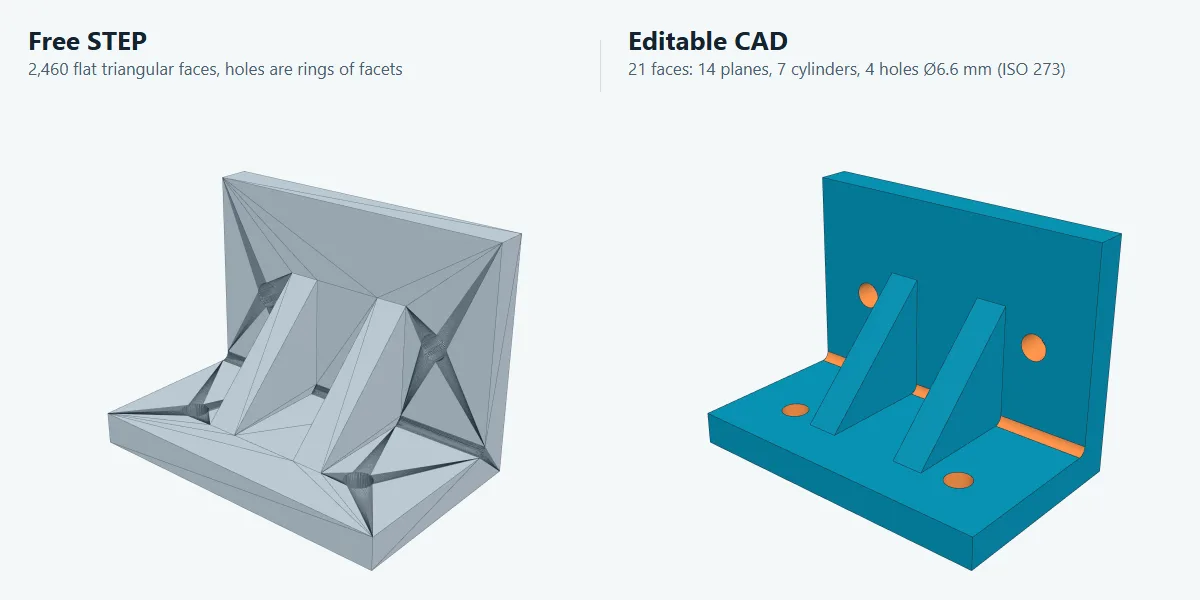
The free converter keeps every triangle as a flat face. The STEP opens in any CAD package, but you cannot pick a hole or move a wall. Editable CAD rebuilds the part the way a designer would have drawn it: real planes, real cylinders and holes with a diameter you can change.
| Free STEP | Editable CAD | |
|---|---|---|
| Faces | One flat face per triangle | Real planes and cylinders, a handful of faces |
| Holes | A ring of facets | True cylinders; clearance holes snapped to ISO 273 sizes when the fit allows it |
| In your CAD | Measure, add features on top | Select faces, move walls, resize holes, add fillets |
| Where it runs | Your browser, nothing is uploaded | Our server, in an isolated container with no network access |
| Your file | Never leaves your computer | Deleted after 24 hours, or 7 days after a purchase so you can download it again |
| Price | Free, no account | 4.90 EUR per file after a free preview. Pro includes 10 a month, Ultra 30 |
| Works for | Any mesh | Parts made of flat walls, cylinders and holes: brackets, plates, housings, enclosures, adapters |
Measured on a real part
An L bracket with two ribs and four M6 clearance holes, exported from CAD as STL with 2460 triangles. Measured on 7 October 2026 with the same engine that runs on the server.
| Free STEP | Editable CAD | |
|---|---|---|
| Faces in the STEP | 2460 | 21 |
| Planes / cylinders | 2460 flat triangles | 14 / 7 |
| Holes | rings of facets | 4 × Ø6.6 mm (ISO 273) |
| STEP file size | 5,616 KB | 32 KB |
| Time | 42 s in the browser | 28 s on the server |
How editable CAD works
Load your mesh
Open the converter and drop the STL, OBJ, PLY or 3MF. The free STEP is ready first, as always.
Ask for the free preview
The part is analysed on the server. You see the recognised planes and cylinders in colour, the face count and every hole with its fitted and standard diameter.
Download the editable STEP
Pay 4.90 EUR by card through Stripe, no account needed, or use an included file from Pro or Ultra. The download link also arrives by email.
What it does not do
Organic shapes, figurines, sculpted surfaces and scans of free-form parts are not rebuilt automatically. The analysis says so before you pay, and the free STEP above remains the right file for them. Check critical dimensions before you send a rebuilt part to manufacturing: the preview lists every hole so you can compare it with your drawing.
Open the converterSTL and STEP are not two spellings of the same thing
This is the point most guides skip, and it is why the conversion is not trivial.
| STL (mesh) | STEP (BREP) | |
|---|---|---|
| Describes | Thousands of flat triangles | Exact surfaces and their boundaries |
| A cylinder is | A many sided prism, approximated | A true cylindrical face with a radius |
| Good for | Slicing and 3D printing | Editing, machining, measuring, assemblies |
| Fillet an edge | No, there are no edges to select | Yes, edges and faces are real objects |
| Typical use | Sending a part to a printer | Sending a part to a CAD user or a machine shop |
Converting one to the other means rebuilding geometry that was thrown away when the mesh was made. For prismatic mechanical parts that reconstruction is reliable. For scanned organic shapes it works, but the resulting STEP file carries many small patches rather than a handful of clean faces.
Frequently asked questions
How do I convert an STL file to STEP?
Drop the STL into the converter above and download the STEP file. The work happens in your browser: OpenCASCADE reads the triangle mesh, groups the triangles into faces, and rebuilds them as a real BREP solid, which is what STEP stores. Nothing is uploaded, there is no queue, and the result opens in SolidWorks, Fusion, FreeCAD, Inventor or CATIA like any other STEP file.
What is the difference between STL and STEP?
STL is a mesh format: the shape is described by thousands of flat triangles. It prints well but edits badly, because there are no real edges, holes or fillets to grab hold of. STEP is a BREP format: the shape is described by exact surfaces and their boundaries. It is the neutral exchange standard that Fusion 360, SolidWorks, FreeCAD, Inventor and Onshape all read and write.
Is my file uploaded to a server?
Not for the free conversion: it runs entirely inside your browser through OpenCASCADE compiled to WebAssembly, so the model never leaves your computer. Editable CAD is different: when you ask for the analysis, the file is sent to our server, processed in an isolated container without network access, and deleted after 24 hours, or 7 days after a purchase.
How accurate is the conversion?
The free conversion is exact to the mesh: every triangle becomes a flat face, so the STEP has the same shape and the same faceting as the STL. Editable CAD fits real planes and cylinders to the triangles and snaps clearance holes to ISO 273 sizes when the fit is within tolerance. The preview lists every hole with its fitted and standard diameter, so you can check it before paying.
Is this the same as reverse engineering or scan to CAD?
It is the first half of it. A 3D scan gives you a mesh, and this converter turns that mesh into a STEP solid your CAD package can open. Full parametric reverse engineering, where a human rebuilds the part from sketches and features, is a further step beyond automatic conversion.
What does it cost?
The STEP conversion is free: no sign-up, no file size tier and no watermark. Editable CAD costs 4.90 EUR per file, and you see a free preview before paying. Pro includes 10 editable CAD files a month, Ultra 30.
Which file formats can I feed it?
STL in both binary and ASCII, plus OBJ, PLY and 3MF. The output is always STEP (AP214), which every mainstream CAD system imports.
What is editable CAD?
A STEP file rebuilt from your mesh with real surfaces instead of triangles: the flat walls become planes, the holes and bosses become cylinders, and clearance holes get a standard diameter. In Fusion 360, SolidWorks, FreeCAD or Onshape you can then select a face, move it, resize a hole or add a fillet, which a faceted STEP does not allow.
Which parts work with editable CAD?
Mechanical parts made of flat walls, cylinders and holes: brackets, plates, housings, enclosures, adapters and similar prismatic parts, from a CAD export or a clean 3D scan. Organic and free-form shapes are not rebuilt; the analysis says so before you pay, and you pay nothing.
How do I edit an STL in SolidWorks or Fusion 360?
Convert it to STEP first. With the free STEP you can measure the part and add new features on top of it, but the original faces stay as triangles. With editable CAD you get real planes and cylinders, so you can push and pull walls, change hole sizes and fillet edges directly in SolidWorks, Fusion 360, Inventor or FreeCAD.
Other tools
Part of the EduFacturing tool set.
The rest of the tool set
This tool is open to everyone, no account needed. It is one of a set of more than a hundred engineering tools on EduFacturing: calculators, calibration helpers, slicer references, defect diagnosis, CAD utilities and printer configurators. Most of them sit behind a free account.
Open the converter, no account neededFree account. No card, no trial period.