Convert STL to STEP free, in your browser
Loading the converter…
Runs in your browser, nothing is uploaded.
Free STEP or editable CAD, on the same part
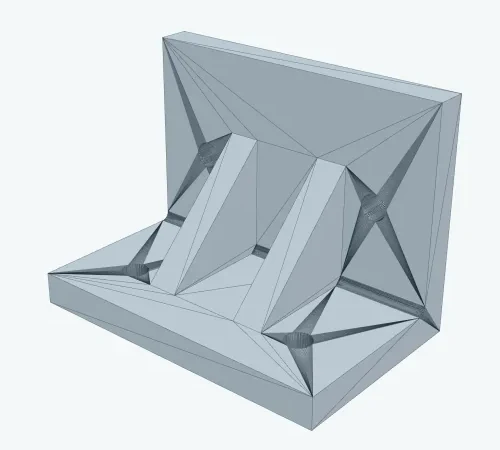
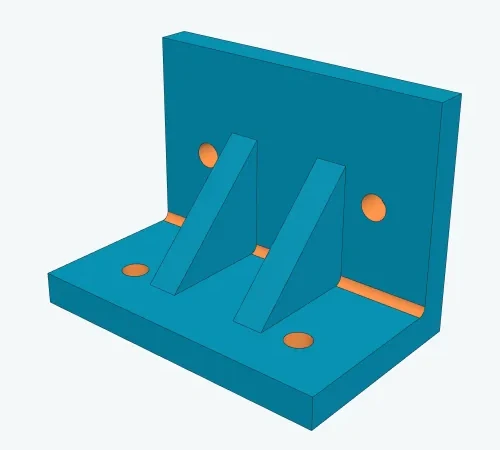
| Measure | Free STEP | Editable CAD |
|---|---|---|
| Faces in the STEP | 2,460 | 21 |
| Planes / cylinders | 2,460 flat triangles | 14 / 7 |
| Holes | rings of facets | 4 × Ø6.6 mm (ISO 273) |
| STEP file size | 5,616 KB | 32 KB |
| Time | 42 s in the browser | 28 s on the server |
| Measure | Free STEP | Editable CAD |
|---|---|---|
| Holes | Rings of facets | True cylinders; ISO 273 sizes when they fit |
| In your CAD | Measure, add on top | Select, move, resize, fillet |
| Your file | Stays in your browser | Sent to our server, deleted after 24 hours (7 days after a purchase) |
| Price | Free, three downloads a day | 4.90 EUR per file after a free preview; Pro includes 10 a month, Ultra 30 |
| Works for | Any mesh | Flat walls, cylinders and holes |
Organic shapes and scans are not rebuilt; the analysis says so before you pay.
Standard holes: ISO 273 sizes
Type a diameter for the closest size.
| Bolt | Clearance hole, medium series (mm) |
|---|---|
| M3 | 3.4 |
| M4 | 4.5 |
| M5 | 5.5 |
| M6 | 6.6 |
| M8 | 9.0 |
| M10 | 11.0 |
What the converter accepts
- Input
- STL, OBJ, PLY, 3MF; one file, up to 32 MB
- Triangles
- Up to 50,000 in the browser; larger models on our server when you are signed in with access
- Simplify
- 10% to 100% in steps of 10%, default 100%
- Output
- STEP AP214 in millimetres: a solid if the mesh is watertight, else a shell
- Sewing tolerance
- 0.000001 mm
- Editable CAD upload
- Up to 30 MB, kept 24 hours (7 days after a purchase)
Frequently asked questions
How do I convert an STL file to STEP?
Drop the STL into the converter above and press “Convert to STEP”. The work happens in your browser: OpenCASCADE reads the triangle mesh, builds faces from the triangles and sews them into a solid, which is what STEP stores. Nothing is uploaded, and the result opens in SolidWorks, Fusion, FreeCAD, Inventor or CATIA like any other STEP file.
Is my file uploaded to a server?
Not for the free conversion: it runs entirely inside your browser through OpenCASCADE compiled to WebAssembly, so the model never leaves your computer. Editable CAD is different: when you ask for the analysis, the file is sent to our server, processed in an isolated container without network access, and deleted after 24 hours, or 7 days after a purchase.
How accurate is the conversion?
The free conversion is exact to the mesh: every triangle becomes a flat face, so the STEP has the same shape and the same faceting as the STL. Editable CAD fits real planes and cylinders to the triangles and snaps clearance holes to ISO 273 sizes when the fit is within tolerance. The preview lists every hole with its fitted and standard diameter, so you can check it before paying.
What does it cost, and what is the daily limit?
The STEP conversion is free and needs no sign-up. It allows three downloads a day for each tool, counted on our server; Pro, 15 EUR a month, has no limit. Editable CAD costs 4.90 EUR per file after a free preview, and Pro includes 10 files a month, Ultra 30.
Which file formats can I use?
STL in both binary and ASCII, plus OBJ, PLY and 3MF. The output is always STEP (AP214), which every mainstream CAD system imports.
What is editable CAD, and which parts work?
A STEP file rebuilt from your mesh with real surfaces instead of triangles: flat walls become planes, holes and bosses become cylinders, and clearance holes get a standard diameter. It works for mechanical parts made of flat walls, cylinders and holes, such as brackets, plates, housings and adapters. Organic and free-form shapes are not rebuilt; the analysis says so before you pay, and you pay nothing.
How do I edit an STL in SolidWorks or Fusion 360?
Convert it to STEP first. With the free STEP you can measure the part and add new features on top of it, but the original faces stay as triangles. With editable CAD you get real planes and cylinders, so you can push and pull walls, change hole sizes and fillet edges directly in SolidWorks, Fusion 360, Inventor or FreeCAD.
Is this the same as reverse engineering or scan to CAD?
It is the first half of it. A 3D scan gives you a mesh, and this converter turns that mesh into a STEP solid your CAD program can open. Full parametric reverse engineering, where a person rebuilds the part from sketches and features, goes beyond automatic conversion.
More converters
STEP to STL converter · 3MF to STL converter · Image to STL converter · All tools · Pro