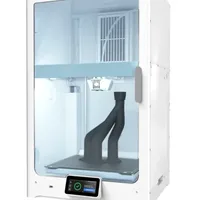
The UltiMaker S7 is UltiMaker's flagship dual-extrusion FDM printer, engineered for demanding production and engineering environments. With a 330×240×300 mm build volume, automatic leveling, a flexible heated build plate and HEPA filtration, the S7 is a direct evolution of the S5 and sets a new standard for reliability, automation and ease of first-layer calibration.
What it is
The S7 is the successor to the proven S5: UltiMaker has kept the tested dual Print Core architecture and generous build volume but added three key improvements: (1) a flexible magnetic PEI build plate for tool-free part removal, (2) built-in HEPA and active-carbon filtration for safe operation in an office or educational setting, and (3) an optimised automatic leveling procedure that shortens setup time. The printer works with UltiMaker Cura and supports soluble PVA supports: essential for complex geometries without manual post-processing. It is positioned in the industrial and prosumer segment and is found in R&D departments, universities and small-volume production.
Technical specifications
| Technology | FDM dual-extrusion (Dual Print Core) |
|---|---|
| Build volume | 330 × 240 × 300 mm |
| Extruder system | Dual Print Core: tool-free hot-swap |
| Build plate | Flexible magnetic PEI, heated up to 140°C |
| Filtration | HEPA + active carbon |
| Leveling | Automatic active leveling |
| Connectivity | Wi-Fi, Ethernet, UltiMaker Digital Factory |
| Class / Price | Industrial · ~€8,500 |
Applications and industries
- Complex functional prototypes with PVA supports (The dual-extrusion system prints water-soluble PVA supports alongside the main material) after dissolving in plain water, the result is precise internal channels and overhang geometries with no trace of manual support removal. (Product design and engineering)
- Manufacturing jigs and fixtures (Nylon, ABS and PC enable production of load-bearing assembly templates and locating fixtures directly from CAD) a fast and economical replacement for machined aluminium tooling in small-batch production. (Automotive and manufacturing)
- Low-volume end-use part production: Precise dual-head printing with engineering polymers (Nylon, PC, CPE) enables direct production of functional end-use parts: 1 to 100 units, without the tooling cost of injection moulding. (Consumer electronics and aerospace)
Production workflow
- Clean the flexible PEI build plate with isopropyl alcohol (IPA). A degreased, residue-free surface guarantees optimal first-layer adhesion.
- Run the automatic active leveling sequence from the printer menu. The printer maps the plate topography and automatically compensates for unevenness across the full X/Y field during printing.
- Fine-tune the Z-offset for precise first-layer squish. The first layer is well-squished and adhered without elephant's foot or corner lifting.
- Run the dual Print Core XY offset calibration via UltiMaker Cura or the touchscreen. Both extruders are precisely aligned: critical for seam quality in dual-material printing and PVA support accuracy.
- Set the material flow rate for each Print Core individually via Cura. Optimised flow: no structural gaps from under-extrusion or surface blobs from over-extrusion.
Key considerations
Materials and applications
Pick a material/alloy this machine processes to see its properties and typical applications:
Conclusion
The UltiMaker S7 is an evolution rather than a revolution compared to the S5, but the three concrete improvements (flexible build plate, HEPA filtration, optimised leveling) make daily operation noticeably more comfortable. The machine is ideal for teams that rely on PVA supports for complex geometries and need a reliable, quiet printer with approved safety credentials for an office environment. If speed is the priority, CoreXY machines like the Bambu X1C offer a faster cycle; if the priority is precise dual-material printing with engineering polymers in a controlled setting, the S7 is hard to beat.
The full picture
This article is one page from The Big Book of 3D Printing: 704 illustrated pages covering every technology, material and fix in one reference.
Read it on Kindle →Engineer, author of The Big Book of 3D Printing and additive manufacturing expert
Updated on 11 September 2026
This article was written with AI assistance; the facts were checked against the sources on 11 September 2026.